

For years, the back-end of Blogging Wizard was a mess. And fixing it wasn’t fun.
Not the content itself. I’m proud of every post we’ve published. Ok, well, most of them.
But the way that content was organized was crap.
I started this site in 2012. Back then, I wasn’t thinking about topical clusters and I didn’t see Google’s insane SiteFocusScore classifier coming. Nobody did.
I was just thinking about getting my ideas out there. I set up a few basic categories, felt good about myself, and hit publish.
But over the next decade, as the site grew and the creator economy evolved, those categories became a burden.
Every time I added a new topic, I’d just tack on another category.
In this post, I’ll explain why my 2012 structure wasn’t working 10+ years later, how I torched my blog categories, and how I fixed them so they didn’t suck.
Let’s go.
The legacy trap: why my 2012 structure wasn’t working 10+ years later
In the early days, a simple list of categories worked.
But as Blogging Wizard expanded into topics like monetization and advanced SEO, the structure started to sag under the weight of the content.
I’d make occasional tweaks to the design. I’d try to dress it up. But the foundation was failing.
The categories were no longer helpful; they were just a list of labels. If you wanted to learn about monetizing your blog, you’d find a jumbled list of 50 posts covering top-level strategy and specific tactics. There was no way to dig deeper into sub-categories.
The design was basic and the lack of sub-categories made it messy:

And it was a complete disaster from a topical authority perspective.
Search engines want to see a clear relationship between your topics and some kind of logical flow.
That just was none-existant.
My site was sending mixed signals, and it was time for a drastic change. There weren’t any breadcrumbs either. More on that in a moment.
The real kicker? I freaking know better. I’ve been doing SEO for longer than I’ve been running Blogging Wizard.
That’s what gets me most about the situation that I allowed to unravel. It didn’t have to get to this point. I was just too pre-occupied with other things to bother fixing it.
I’ll show you the “after” screenshot for the same category in a moment, but first I need to give you some context on the changes.
The great demolition: ripping out the foundation of Blogging Wizard’s category structure
Tweaking things wasn’t enough. I needed to burn it down. Right down.
I’m talking about a total demolition of my existing category structure. Every post, every tag, every parent-child relationship….gone.
I won’t sugarcoat it: this was incredibly tedious.
We’re talking about manually re-categorizing hundreds of articles.
It’s the kind of work that makes your eyes glaze over.

But I didn’t do this without a plan. I wasn’t going to wing it and let my categories change over time like they did before.
Note: I know I could have found a way to do this with AI but there’s two issues; it would take me ages to rig up a system to do it. And AI makes way too many mistakes. I’ll leave my reasoning there.
The lifecycle strategy: mapping content to the blogger’s journey
Instead of just grouping things by topic, I decided to group them by the stage of the journey.
This is where we moved away from random labels and toward a strategic architecture.
I settled on five core pillars:
- Start Your Blog: The foundational stuff. mindset, naming, and technical setup.
- Build Your Blog: Design, core content, and high-level strategy.
- Grow Your Blog: The traffic engine. SEO, social, outreach, etc.
- Monetize Your Blog: Turning that traffic into revenue through funnels and products.
- The Blogger’s Stack: The tools and gear that powers the whole operation.
Each of these categories also has sub-categories to make it even easier for people to find what they’re looking for.
Anyway, the point of this change was to turn Blogging Wizard into a roadmap, rather than a collection of articles.
Now, the site doesn’t just host articles; it hosts a roadmap.
Here’s the new version of the “monetization” category example I showed you earlier:
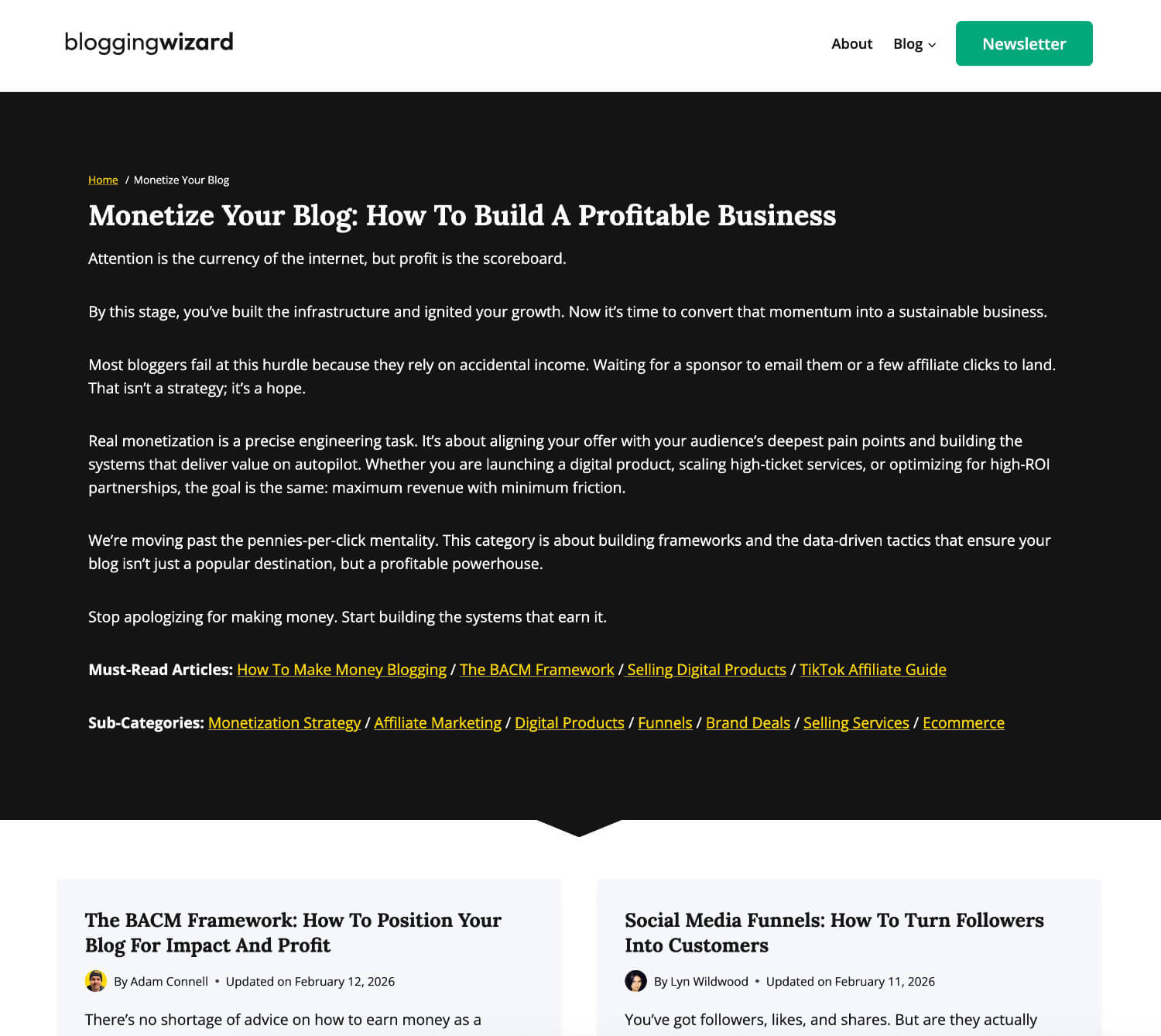
I replaced the solitary category page title with a completely new hero section that I built with Kadence’s Hooked Elements feature. Kadence is the WordPress theme I’m using, by the way.
I added sub-categories as well. These allow readers to get more granular and find content that solves their problems faster.
On the page, we’ve got:
- Breadcrumbs – Important for search engines and humans. More on this in a moment.
- Extended H1 headline – This makes the category title more descriptive.
- Description – There’s a description that explains what people will find in this category. They’re a bit more lengthy than I’d like personally so I may trim them down eventually.
- Links to recommended articles – These are links to our pillar posts. Good for humans and good for search engines.
- Links to sub-categories – Click through to one of these sub-categories and you’ll see a similar hero section minus links to sub-categories, of course.
There are a few other details that you can’t see in the screenshot above. I added optimized SEO titles for all category pages and meta descriptions.
Old SEO titles were just [Category Name] – Blogging Wizard. They were basic and lacked context.
But I had them set to NOINDEX in the past so it didn’t matter too much. Well, not for SEO purposes at least.
Another reason for this is to avoid duplicate content issues since there was no other content on the page aside from a title. That’s another reason to include some unique content on the page.
Now, because part of the reason I torched my categories is to help search engines understand how my content fits together, it made sense to set them to INDEX in SEOPress (my WordPress SEO plugin of choice).
And because I had actual unique customized content on each category page, that means no potential duplicate content issues by allowing them to be indexed.
It also seemed like a great time to make sure other parts of my site had breadcrumbs enabled. Specifically blog posts.
So, I added breadcrumbs to blog posts. This is important because it gives people and search engines context as to where every post sits within the structure of my site.
You can land on a single post and know exactly where it fits & what else fits around it.
Well, that’s if you use category-based breadcrumbs like I did.
I see a lot of sites using breadcrumbs to display something like “Home / Blog / Post Title.”
The funny thing about doing it that way? It just tells search engines that the post they crawled exists on the blog which is part of the website.
I’m sure search engines were able to figure that out by themselves. 😂
That isn’t a good way to use them so don’t do that.
So, we use categories in our breadcrumbs to give search engines extra context. And it’s helpful for visitors too, so it’s a win-win.
Anyway, I could have set Kadence to display categories as part of the entry-meta information instead. That would have looked visually appealing.
But breadcrumbs made the most sense. Especially for SEO purposes.
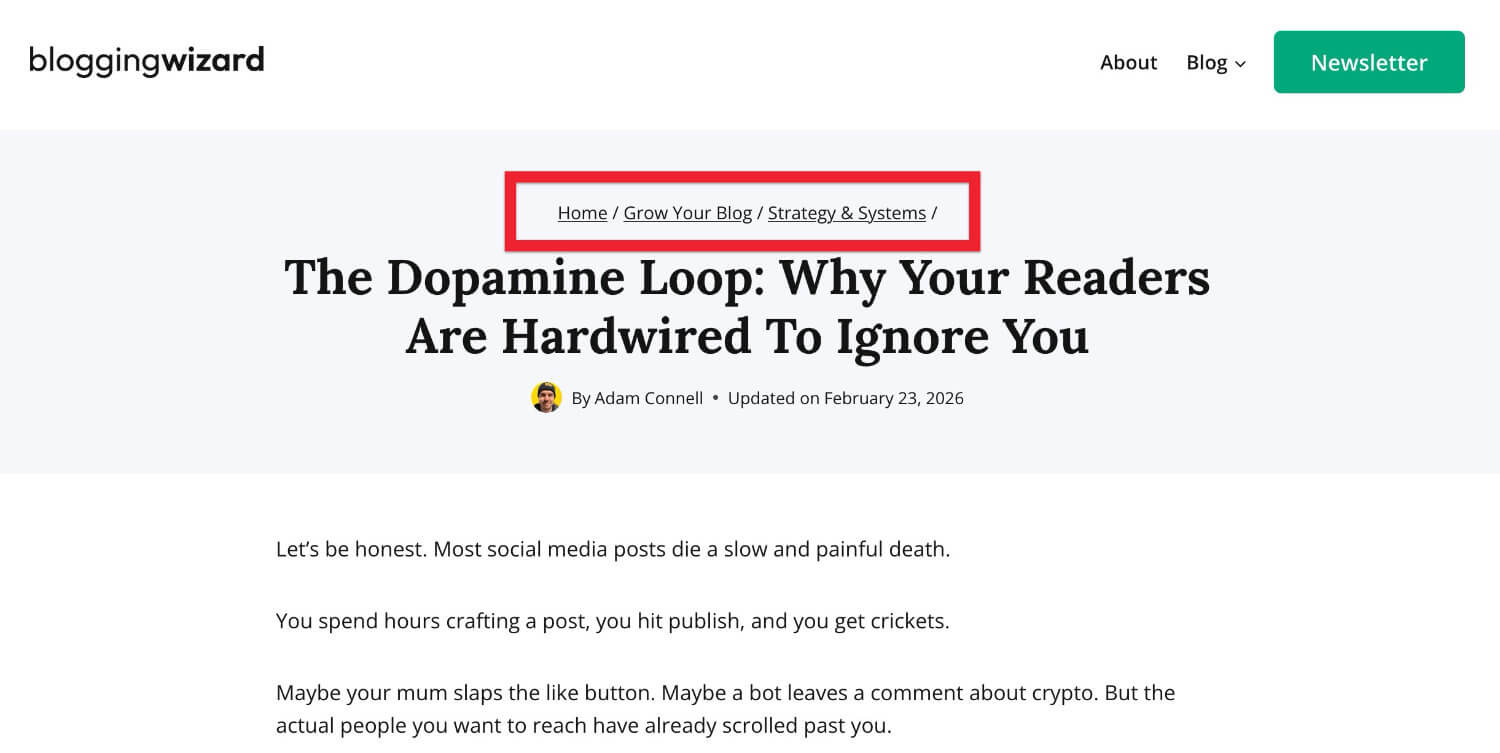
Note: If you use tags in WordPress, be sure to set those to NOINDEX, especially if you’re allowing categories to be indexed. Tags are another taxonomy in WordPress that you can use for organizing site structure. Best practice is to just avoid using them entirely. They’re just not very useful.
How I built the new category experience (and the tools I used)
To make this work, I couldn’t just rely on default WordPress settings.
Why? Because you get something like this:
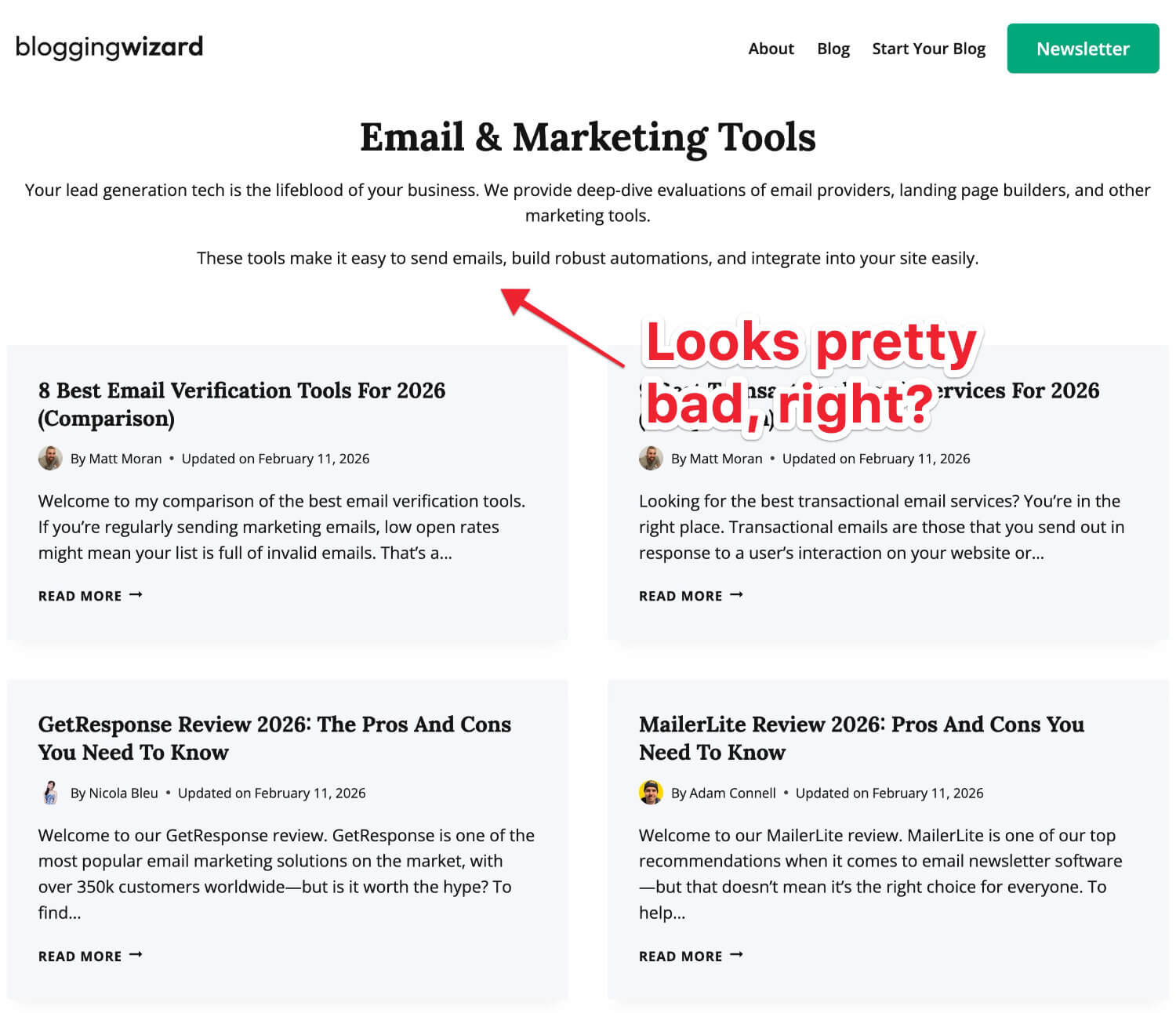
Look, I’m not a designer so I won’t pretend that I’ve designed the most attractive website in the world. Because I haven’t.
But that “out of the box” category page was just bad. And WordPress gave me no way to edit that description box in any meaningful way.
No breadcrumbs either. That’s an important part of this change. I’ll explain why they’re important in a moment.
I needed surgical control over how these category pages looked and functioned. This boiled down to two specific tools. Well, specific features within tools I was already using.
1. Kadence Theme (and the Hooked Elements feature)
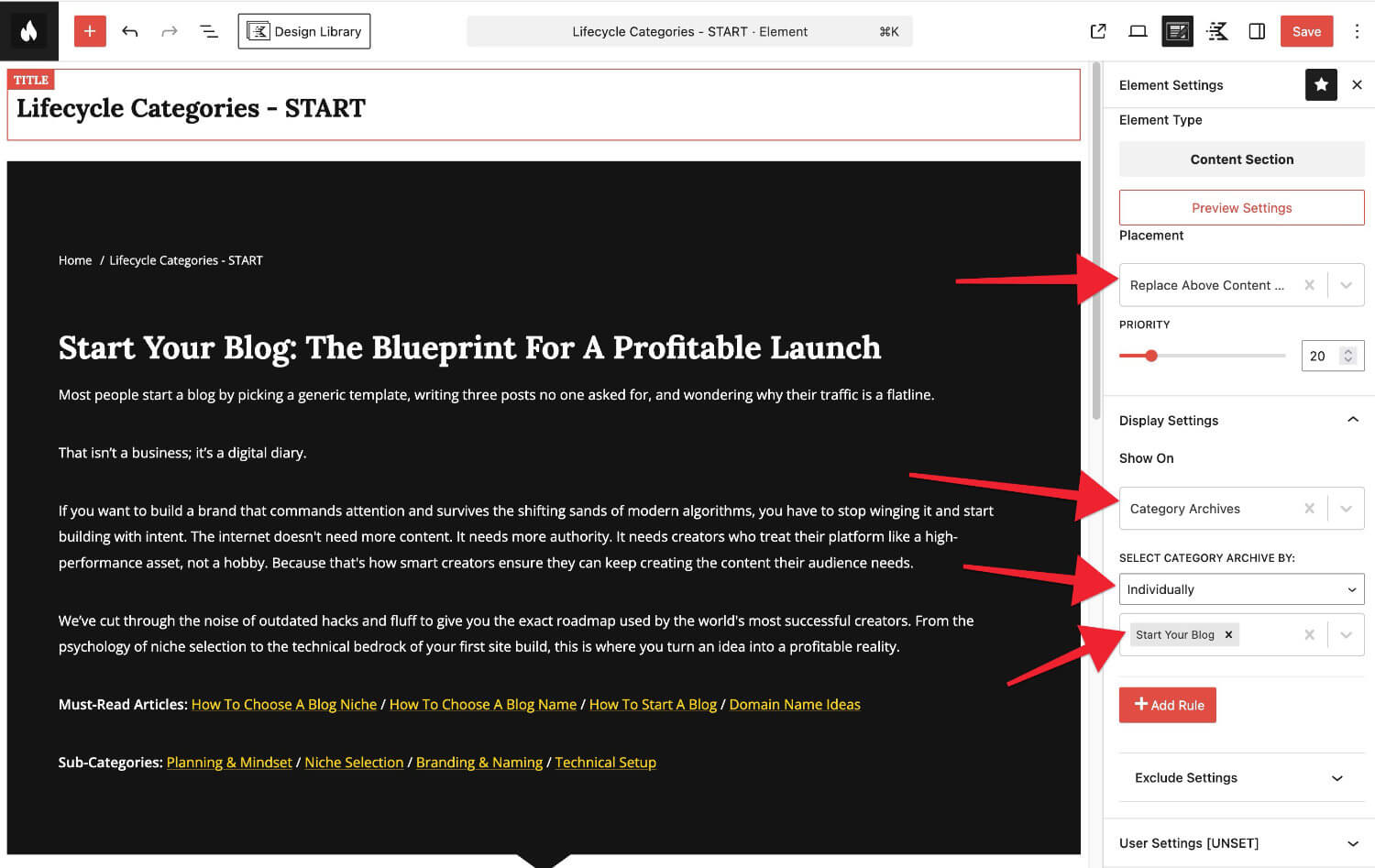
To solve the category page customization limitations, I used the Hooked Elements feature in my WordPress theme; Kadence.
There’s a solid free version of this theme, but with a premium Kadence license, I can build a custom hero section using the WordPress block editor.
This gave me a lot of control so I could add all of the elements that I mentioned earlier; custom H1, description, must-read articles, sub-categories, etc.
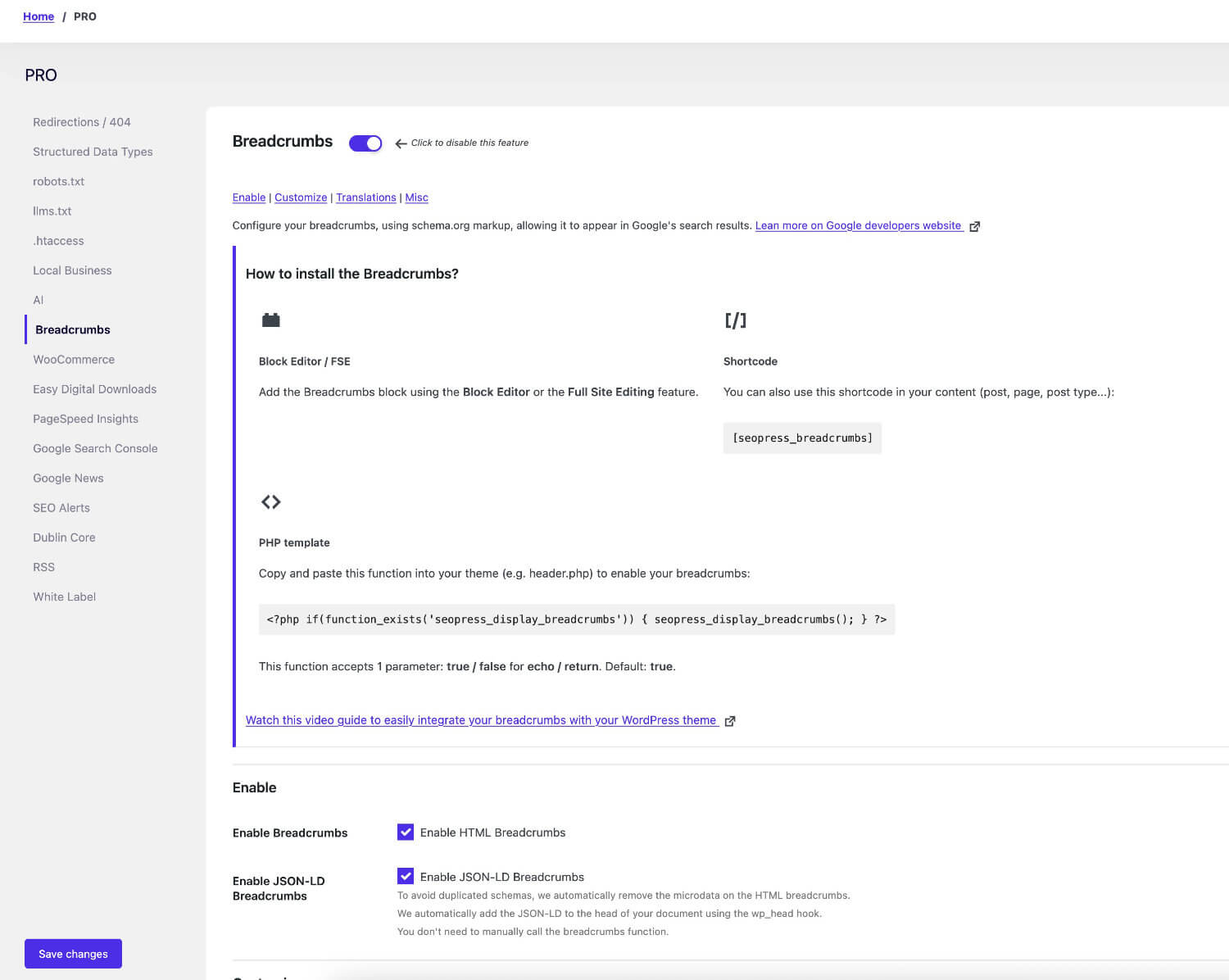
2. SEOPress Pro (for advanced Breadcrumbs)
Breadcrumbs are the unsung heroes of site structure. They tell the reader exactly where they are and they tell Google exactly how your content silos are built.
And with how hard Google is slapping sites around for going too broad, I needed to be able to explain to them how all of my content fits within the blogging landscape.
Because clearly Google can’t figure this out. At least not with the way their SiteFocusScore and SiteRadius classifiers work. Which is… badly.
Anyway, breadcrumbs are one of the ways we do this.
SEOPress is my go-to SEO plugin. I’ve used pretty much every SEO plugin on the market. I’ve had issues with some of the big names (I don’t need to name them). But this is what I settled on.
I’d been getting by fine with the free version. But that didn’t have the breadcrumbs feature that I needed.
So, I bought an SEOPress Pro license so I could use it. It does have some other cool paid features that I might end up using at a later date.
But for now, I can do what I need with breadcrumbs. It handles multi-level breadcrumbs flawlessly and allows me to display categories as breadcrumbs.
So, you’d see something like this: Home / Grow Your Blog / SEO Strategy at the top of my category pages and blog posts.
That’s a massive win for usability and a subtle but powerful signal for search engines.
And because I was building custom hero sections for my category pages, I needed a breadcrumb block for the visual editor, which SEOPress Pro also provided.
Note: Whilst I was working on this, I used SEOPress PROs broken link checker to find a bunch of broken links. I wish I’d pulled the trigger on the paid version years ago. Better late than never, eh? Get SEOPress Pro here with my link.
How to build a high-authority silo structure (and why my approach may not work for you)
Look, the biggest mistake I made in the “old” Blogging Wizard was checking too many boxes.
I’d write a post and think, “Well, this is about SEO, but it’s also about WordPress, and technically it’s a review…”
So I’d check all three.
Back in the day, that wasn’t much of an issue. Or at least it didn’t seem like it. But now? Google looks at that and sees a site that doesn’t know what it wants to be.
With the new structure, each post will have one main category and one sub-category. It’s a strict virtual silo structure with no exceptions.
Every single post has a permanent home. This forces content to serve a specific purpose in the blogger’s journey. If a post feels like it belongs in two places, either the content isn’t focused enough or I need a new sub-category.
Either way, it forces me to be more organized and that’s now reflected in my updated content strategy. And that’s a good thing in every possible way.
Note: A virtual silo structure is where you rely on internal linking to illustrate relationships between content. This is the best option because I can use breadcrumbs and other internal links to show search engines how my content connects. And I don’t have to update any of my post’s permalinks to include a category. That would be tedious and likely tank my rankings.
The bridge strategy: why I’m using a hybrid silo approach
Now, I’m not just building isolated islands of content. If I did that, the user experience would suck.
I’m using what’s known in the SEO world as a hybrid silo (or a “cross-linked” silo).
While the structural organization is strict (the URL and the breadcrumbs), the internal linking is fluid. I’m connecting the lifecycles together using strategic links.
We could call these bridges, I guess.
For example, a post in Grow Your Blog / SEO Strategy might link to a post in Monetize Your Blog / Affiliate Marketing.
Why? Because you don’t just grow for the sake of growing. The next logical step is to monetize that growth.
By linking across silos based on user intent rather than just keywords, I’m sending a message to Google that says: “Everything on this site is connected to the success of a blogger/creator.”
Well, that’s the message I’m sending. That’s the message people will see. Whether Google will actually understand that message? Let’s wait and see.
A warning: this architecture isn’t for everyone
Before you go nuking your own categories, you need to understand something:
This specific lifecycle structure is built for a personal brand/expert-led resource.
It works for me because I’m teaching a process.
But this structure would be a total train wreck for other types of sites:
- News & magazine sites: If you’re running a tech news site, you need a topical silo. You need categories like Apple, Android, and Gaming because your readers are looking for updates, not a journey.
- Ecommerce stores: A clothing brand needs a silo based on product types (Men’s / Shoes / Boots). Trying to organize a pair of boots by a “lifecycle” would just confuse the hell out of someone who just wants to buy footwear.
- Local service businesses: A plumber doesn’t need a “Plumbing Journey.” They need a geographic/service silo (Emergency Repair / City Name).
My approach is built for Blogging Wizard.
It’s built for the way my readers think.
Before you copy me, ask yourself: “Is my reader on a journey, or are they just looking for a specific item or update?”
Match your structure to their intent. That’s the real secret.
But, regardless of the structure you choose, readers and search engines need to know what that structure actually is. It needs to be obvious and staring them in the face. And that’s what custom category pages & breadcrumbs tell the world.
My redirect strategy: why I didn’t just delete and pray
Now, look.
You might be thinking, “Adam, if you torched the old categories, didn’t you just break a load of links?”
And the answer is: Yes. I absolutely did.
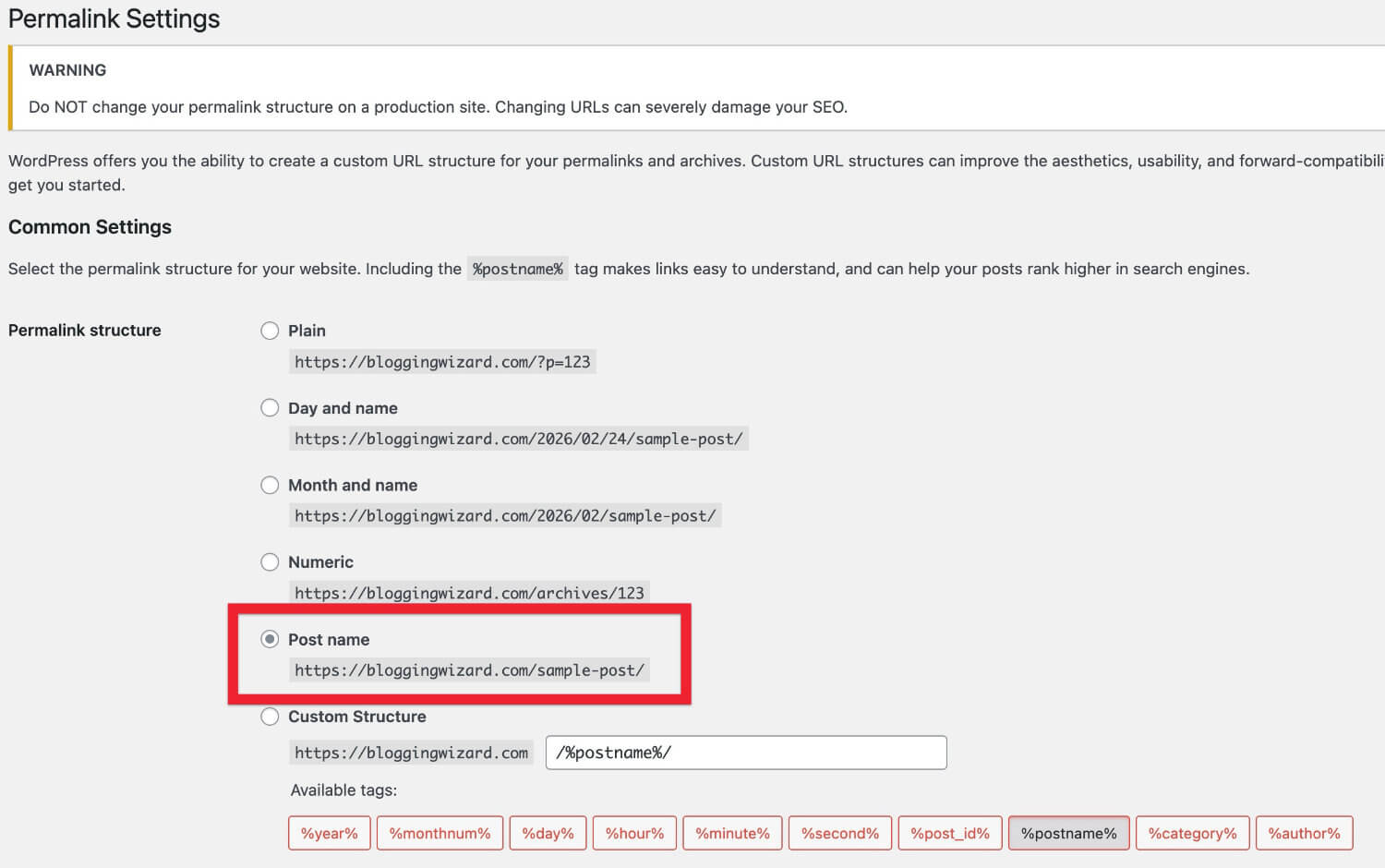
But not as many as I might have done If my permalink structure included categories.
If that were the case, then I probably wouldn’t have gone through this process. It would have been so messy.
This is why I recommend using domain.com/post-name/ as your permalink structure.
Anyway, when you change your category structure, you naturally end up changing a lot of URLs. Some change location and others are removed.
And if you just flip the switch without a plan, you’re essentially telling Google and your readers to go visit a house that’s been bulldozed.
Anyone trying to access your old categories will be faced with a 404 error page.
To avoid a total SEO heart attack, I had to implement a 301 redirect strategy.
Think of a 301 redirect as a “permanent change of address” form at the post office.
So, this meant that every old category needed to be redirected to a new one. Or the next closest thing to it. Some were deleted entirely.
I manage redirects in my site’s .htaccess folder. It’s great for performance but if you’re not confident updating this document, you may want to avoid this option. You can take down your entire site with a rogue hyphen.
A good alternative for this is SEOPress Pro. Specifically their Redirection Module. There are free alternatives but I like the functionality of this better than most others I’ve tried.

Using a plugin like this means you can easily map every old URL to its new home with precision. And if you ever need to update your redirects? It’s a few clicks and no risk of trashing your entire site.
Link equity is maintained and readers (or search engines) don’t get blagged.
Everyone lands where they should.
Sure, I didn’t have my category pages indexed, but that doesn’t matter. Every site needs to practice good link hygiene.
It’s also a good idea to check through your old redirects if you have any. For example, if you’ve removed a category page in the past or redirected a dead article to a category page, you’d need to update those redirects as well.
Note: You’d be surprised at the sort of sites that don’t have a good redirect strategy in place. I’m talking about sites with SEO teams of 40+ people. They tend to be the worst at managing redirects. When we started publishing a lot of data-driven articles, I noticed that large brands would kill pages with huge numbers of referring domains and not bother redirecting them. In some cases, upwards of a thousand referring domains. That’s a huge missed opportunity. They can get away with it but for bloggers like us? We have to make the most of every link pointing to our site. So, always have a solid redirect strategy in place.
There’s another reason why I’m doing this
Now, there is another reason I’ve spent weeks of my life tinkering with this.
And it has nothing to do with forgetting about the option to edit WordPress categories in bulk. That’s fine. I needed to do it all individually anyway. Or at least, that’s what I keep telling myself. 🫠
It’s bigger than just improving UX or sending the right signals to search engines. Although, the latter is part of it.
Right now, it’s a high-stakes experiment. I have a theory about how this new structure will impact Blogging Wizard’s search rankings, but I want to see the data first. I want to see if the needle moves the way I expect it to.
For now, I’ll be playing the waiting game and spending way too much time looking at my analytics.
If it goes well, I’ll write a follow-up post explaining what happened. I might even put together a video. We’ll see.
If it doesn’t go well, then I probably won’t do a followup. I’ll be busy trying to forget about how much time I wasted. And how I neglected my YouTube channel for even longer when I didn’t have to.
If you want to make sure you’re in the room when I share those results, you should probably be on my newsletter list. You’ll be the first to get a heads up when it goes live. And any other useful blogging-related content.
Get on my VIP newsletter here.
The bottom line: don’t let your past dictate your future
Looking back, I should have done this years ago. I let avoidance dictate my strategy for far too long.
If your blog feels like a cluttered attic, stop trying to reorganize the dust.
Sometimes you have to clear it all out and build the shelves you actually need for the business you have now, not the one you had in 2012.
It’s tedious. It’s a grind. And involves a lot of staring at your computer screen.
But when you see how much better it’ll be for your readers (and the SEO benefits that come with it) you’ll realize it was the best investment you could have made.
Disclosure: Our content is reader-supported. If you click on certain links we may make a commission.
