

Is your brand more active on social media, but you still haven’t quite figured out how to work Facebook and Instagram stories into your strategy?
Stories are a unique social media feature that a lot of creators struggle with. Many use them to simply promote their latest Facebook and Instagram posts, which is fine, but there’s a lot more you can do with this feature.
In this post, we share tips on how to use stories to humanize your blog’s brand.
1. Understand what Facebook and Instagram stories are
Facebook and Instagram Stories are temporary posts that only appear on social media for 24 hours.

They’re deleted automatically after that, but the creator has the ability to add individual stories to highlight collections on their page so their followers can view them whenever they want.
Facebook and Instagram are both owned by the same company, Meta, so they more or less function in the same way even though these platforms are quite different from one another.
Here are technical specifications for stories on both platforms:
- Images
- Maximum runtime of five seconds on Facebook and six seconds on Instagram
- Maximum file size of 30MB
- JPEG and PNG image formats supported
- Videos
- Maximum runtime of 15 seconds
- Maximum file size of 4GB
- MP4 and MOV video formats supported
You can add stickers and text overlays to stories, but subtitles are not supported. They must be added to videos before you add them to stories.
Instagram supports aspect ratios of 9:16 and 4:5 to 1.91:1 for both image and video-based stories, but Facebook only supports 9:16 to 1.91:1 for image-based stories.
Images and videos you shoot on a smartphone should be supported by Facebook and Instagram natively, if you want to keep things simple.
Where do stories appear?
On Facebook, stories appear above your follower’s news feed.
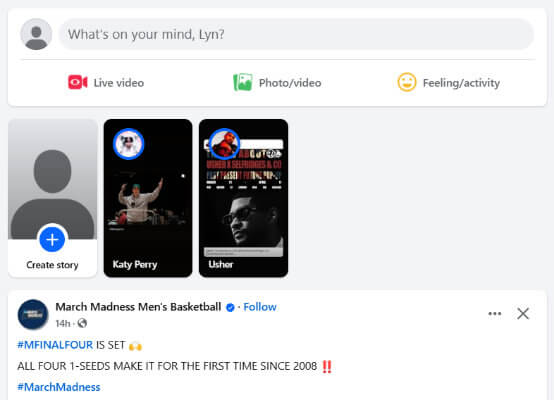
Stories will only appear for accounts the user follows.
This is what makes stories so valuable for marketing. Your follower might genuinely want to keep up with your blog on social media, but your posts get drowned out by all of the noise in their feed.
After all, other than the YouTube Subscriptions page, there are hardly any social media platforms left that base feeds in chronological order.
Everything is based on algorithms now, so one user’s feed looks completely different from another user’s feed because it’s based on content each user interacted with in the past.
But stories are different. As long as your follower keeps watching your stories, your stories will always appear first in the list. That’s pretty powerful in the wild world of marketing.
Instagram Stories are the same. They appear above your follower’s feed.
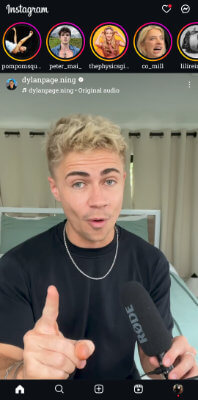
If users view your Facebook page or Instagram profile, they can click on your profile picture to view your latest stories.
A ring will glow around your profile picture when a new story is available: blue on Facebook and orange/pink on Instagram.
2. Understand how creators use Facebook and Instagram stories
Creators use stories in a lot of different ways.
First, they use them in the way we already mentioned: they share their latest posts on Facebook and Instagram to their stories.
All a user has to do is click on the post link in the story to be taken to it.
It’s a decent way to promote your latest social media posts, but because your follower might have already seen these posts naturally in their feed or directly by visiting your page, it’s not the best strategy to use.
Here are other ways creators use stories on social media:
- Quick updates about upcoming content
- Teasers for upcoming content
- Short vlogs
- Share images you don’t want to include in official posts
- Affiliate marketing and sponsored posts
- Share posts from other users
3. Create original social media content
If you want to succeed on social media as a blogger, you need to understand internet users use social media.
Most bloggers make the mistake of using social media as a content promotion strategy for their blog. And nothing more.
They’ll only share links to their latest posts wherever links are allowed. Even worse, they’ll make videos that demonstrate a small portion of a solution to a problem, then end the video with a call to action like, “learn more on my website. Link in bio.”
What most bloggers don’t realize is that social media users want to stay on social media. They don’t want to visit your website to learn what you should have included in your video.
In reality, your social media content should be an extension of your brand, not an extension of your blog.
This means creating original social media content.
You should especially create social media content that can be consumed entirely in one post. If you’re trying to teach your audience something, include everything in one video.
With that said, it is acceptable to break some things down into multiple videos.
Anyway, I wanted to stress the importance of bloggers creating original social media content before continuing. It’ll be much easier for you to figure out what content to include in stories if you’re already used to creating original social media content.
Note: This isn’t to say that you should never link back to your blog or include CTAs in your videos/content. You definitely should. But this type of content should account for a much smaller portion of the overall content you publish on social media. Also it’s worth noting that text-based content with links typically performs poorly. This is because social networks naturally want to keep their users on their platform.
4. Share adventures in short vlogs
When a follower views one of your stories, whether it’s on Facebook or Instagram, the app will play the next story you have available automatically.
Take this small feature into consideration when you create stories.
For example, if you’re doing something related to your niche, take your audience along for the ride by filming short video clips and taking images throughout the adventure.
Remember, stories can only be up to 15 seconds long. Any clips longer than that will have to be uploaded as reels.
When you’re done, upload the images and clips in an order that makes sense for them to appear in. Your followers will be able to watch the first story, then every subsequent story will play automatically.
5. Share exciting moments with short clips and images
Whenever you do something related to your niche or brand, you’ll experience exciting or interesting moments every now and then.
Pull out your smartphone when things like this happen, and record them with videos and images.
If they’re very exciting or interesting, save them for official posts and reels.
If not, share them as stories.
6. Share posts from other users
Big brands are known for being faceless and non-inclusive. Heck, even some marketers will teach you not to link to competitors so you don’t pass on link equity to pages that outrank you.
Social media is different.
If your follower receives your competitor’s content in their feeds and likes it, chances are the algorithm will recommend your content to them as well.
You can really do a lot to humanize your brand by shouting out other creators in your niche and showing them support.
Your followers will respect the positive vibes it puts out into the world, and your competitors may even give you shoutouts.
You can do this with user-generated content as well.
User-generated content (UGC) is content that’s about or inspired by your brand.
So, if you spot a video or image a user made that’s linked to your brand in some type of way, share it in your story.
It might even convince other users to create their own UGC.
7. Engage with your audience through stories
The best way to humanize your brand is to engage with your audience as much as possible.
You can do this by responding to their comments and liking their comments. TikTok even allows you to reply to comments with videos.
But you can also use stories, especially Instagram Stories, to create engaging posts.
Use stickers to poll your audience, and ask them questions.
You can even use Instagram Stories to host a Q&A.
8. Work stories into your marketing strategy
Once you start creating original social media, you’ll have multiple content channels to manage: one for your blog and one for every social media platform you publish to.
If you have a podcast, a Patreon and a YouTube channel, count them as individual content channels as well.
Facebook and Instagram stories are a lot more casual than primary content channels, but you can still find strategic ways to work them into your overall marketing strategy.
For starters, if you’re publishing a blog post soon, come up with a few story ideas that can promote your post.
For example, if you’re in the guitar niche and your post is a review for a new acoustic guitar, use stories to post things you couldn’t include in your article, such as you testing the guitar in different ways, a series of stories that demonstrate the quality of the guitar’s packaging and what’s included in the box, or even a short video of you playing the guitar.
Scheduling stories
If you’re going to work stories into your marketing strategy, you might as well schedule them.
We use and recommend SocialBee here at Blogging Wizard for social media scheduling.
It won’t allow you to add stickers and other overlays to your stories, but it offers an easy way to schedule your stories in advance. You can also schedule other types of content in advance, monitor analytics, and more.
Final thoughts
Facebook and Instagram Stories are a great opportunity to get more visibility on social media.
But they’re not just for promoting your latest blog posts. You can do a lot more with them.
You can use them to share original content, adventures, exciting moments, and engage with your audience.
And if you find them time consuming. Consider creating content for them in batches and scheduling them in advance with SocialBee.
While you won’t be able to add stickers or links when scheduling stories, you can save a lot of time.
Disclosure: Our content is reader-supported. If you click on certain links we may make a commission.
